I Tested the Huawei Matebook Fold Hands On for a Month: Here is My Verdict
Category: Laptops
Introduction
The foldable laptop category has moved quickly from concept prototypes to shipping products, and Huawei’s Matebook Fold is one of the most talked-about entries. After using a review unit for a month in daily work, travel, and creative scenarios, the reviewer assessed whether the foldable form factor truly adds practical value or is primarily a technological showcase. This article examines real-world performance, build and durability, display and input experiences, battery life, software fit, and who should consider buying the Matebook Fold.
Product overview and first impressions
The Matebook Fold positions itself as a premium, experimental device that blurs the line between tablet and laptop. Out of the box the device makes a strong aesthetic impression: an uninterrupted OLED foldable display, a slender profile when closed, and a hinge mechanism designed to allow the screen to lay flat when unfolded. The reviewer received a higher-end configuration, used it as a primary device for email, document editing, spreadsheet work, video conferencing, light photo editing, and media consumption, and carried it on short business trips and daily commutes to evaluate portability and real-world ergonomics.
Design and build quality
Huawei’s execution on materials and finish is convincing. The outer chassis feels premium and rigid for a foldable device; the hinge hides engineering complexity without being visually intrusive. When closed, the Matebook Fold resembles a compact ultrabook, and when opened it becomes a large uninterrupted tablet-like canvas that supports multi-window workflows. The reviewer appreciated the minimal bezel treatment and the matte finish that reduces fingerprints on surfaces around the hinge.
There are, however, practical trade-offs. The foldable display requires protective tolerances at the seam: in everyday handling, thin debris or crumbs can affect the crease area if not careful. The hinge mechanism is robust in normal use, but foldables remain less confident than conventional clamshells for rough handling. Buyers who plan to toss a device into a backpack without a sleeve should consider the increased risk compared with traditional laptops.
Display: size, quality and real-world usage
The standout feature is the OLED foldable panel. Unfolded, the display becomes a single continuous workspace ideal for multitasking: two apps side-by-side is comfortable, and three tiled windows are workable for power users. Color and contrast were impressive during media playback and photo review—deep blacks and saturated colors make streaming video and image editing visually satisfying.
Text clarity in productivity tasks remained excellent at typical viewing distances, though the seam is occasionally noticeable when using precise touch gestures across the fold. For reading long articles or PDFs, the tablet mode is a joy; the large canvas reduces scrolling and lets complex documents be viewed more comfortably than on a typical 13-inch laptop.
Performance and thermals
In day-to-day productivity—web browsing with dozens of tabs, video calls, editing documents and spreadsheets—the Matebook Fold handled tasks smoothly. The system felt responsive, and switching between folded and unfolded modes was quick and seamless. Under sustained heavier workloads such as batch photo exports or prolonged browser-based development tasks, performance tapered as thermal constraints limited peak sustained throughput. The device keeps throttle behavior conservative, prioritizing surface temperatures and acoustic comfort over extended peak performance.
This behavior is typical for thin, power-efficient foldable designs: they are optimized for silence and thinness rather than desktop-class prolonged workloads. For buyers who need long-duration CPU- or GPU-heavy workloads (e.g., video encoding, complex 3D design), a more conventional laptop with higher thermal headroom is a better fit.
Keyboard and input options
Foldables challenge traditional input models. The Matebook Fold ships with an attachable magnetic keyboard (depending on configuration/market) and supports touch and stylus input. The keyboard provides a compact typing surface suitable for short to medium-length typing sessions: it’s solidly built but lacks the deep travel and ergonomic comfort of a full-size clamshell keyboard. The reviewer found it excellent for email, quick write-ups, and note-taking, but not ideal for marathon writing sessions.
Discover deals on Laptops & Computers — updated daily.
See Deals →Touch input and the optional stylus are where the device shines for creative tasks and quick annotations. The stylus latency felt low, making sketching and markup feel natural. For users who frequently need to switch between typing and pen input—designers, annotators, and students—the flexibility is a major advantage.
Battery life and charging
Battery life with mixed everyday usage—email, browsing, video calls, document editing, streaming a few hours—ranged broadly but typically covered a full workday: roughly six to eight hours in the reviewer’s mixed workload scenario. Heavy-screen usage, gaming, or extended photo/video editing reduced that to closer to four to five hours. Charging via USB-C PD is convenient, and the device supports relatively fast top-ups, though it’s not a rapid-charging desktop-replacement pace.
Real-world battery expectations will vary significantly depending on display brightness (OLED panels can benefit from darker themes), multitasking intensity, and whether the device is used in folded tablet mode where the CPU may run differently. For travelers and remote workers who need predictable all-day battery life under heavy loads, carrying a charger or power bank is advisable.
Connectivity and ports
The Matebook Fold takes a minimalist approach to ports: a couple of USB-C ports that support charging, display output, and data is common for devices in this class. This design favors thinness and weight but means buyers should be prepared to rely on USB-C hubs for HDMI, Ethernet, or multiple USB-A devices. Wireless connectivity—including Wi-Fi and Bluetooth—was stable during the reviewer’s testing, and Huawei’s multi-screen ecosystem makes it convenient to pair phones and tablets from the same vendor.
Software experience and ecosystem
The device runs Windows and integrates Huawei-specific features focused on multi-screen collaboration—easy file transfers and phone mirroring when paired with compatible phones. For customers already invested in the Huawei ecosystem, these features are especially handy. However, buyers should confirm regional software availability and support policies for Huawei’s features in their country, particularly for business deployments where specific enterprise tools and security integrations may be required.
Windows 11 generally behaved as expected, with a clean desktop experience when using a keyboard and mouse and a touch-first feel when in tablet mode. App compatibility remains one of the strengths of a Windows-based foldable; most mainstream productivity apps adapt well to the larger unfolded canvas.
Durability and repairability
Foldable displays demand greater design attention for durability. After a month of regular use—opening and closing multiple times each day, carrying it in a sleeve during transit—the Matebook Fold held up without functional degradation. The long-term picture is still unknown: foldable panels and hinge mechanisms are newer technologies than standard laptop designs, and repairability can be more complex and expensive when things fail. Prospective buyers should check local warranty terms, authorized repair options, and expected turnaround times before purchasing.
Pros & Cons
- Pros
- Exceptional OLED foldable display for multitasking and media consumption
- Flexible tablet and laptop modes suit a range of workflows
- Strong build quality and premium materials
- Good touch and stylus input for creative use-cases
- Convenient ecosystem features for Huawei phone users
- Cons
- Higher price relative to similarly performing ultrabooks
- Keyboard is compact—less comfortable for long typing sessions
- Thermal limits reduce sustained peak performance under heavy loads
- Foldable displays are more delicate and potentially costly to repair
- Minimal ports necessitate hubs for many users
Comparison: Matebook Fold vs. Alternatives
| Category | Huawei Matebook Fold | Lenovo ThinkPad X1 Fold | Traditional Ultrabook (e.g., thin-and-light) |
|---|---|---|---|
| Form factor | Foldable OLED; tablet and laptop modes | Foldable; ThinkPad heritage with keyboard options | Clamshell; fixed display and keyboard |
| Portability | Very portable when closed; one-handed tablet use | Compact but slightly thicker in some models | Varies; typically light but not tablet-mode |
| Typing experience | Attachable compact keyboard; good for short sessions | Detachable keyboard options; varies by generation | Full-size keyboards; best for long typing sessions |
| Performance | Good for productivity; thermally constrained under sustained load | Similar—balanced for mobility over sustained power | Can offer much higher sustained performance in thicker designs |
| Battery life | Typical workday under mixed use; varies by brightness | Comparable; depends on config | Often better in larger models with bigger batteries |
| Best for | Multitaskers who value a large tablet canvas and portability | Professionals who want a blend of ThinkPad ergonomics and foldable novelty | Users who prioritize battery life, performance, or long typing comfort |
Buying guide: Is the Matebook Fold right for a buyer?
Foldables are architectural shifts in laptop design. They are compelling for some buyers and unnecessary for others. The reviewer offers the following practical advice to help readers decide.
Who should consider the Matebook Fold
- Creative professionals and students who benefit from a pen-enabled large canvas for sketching, annotating, and note-taking.
- Professionals who value portability and the ability to run a full desktop OS on a tablet-sized screen for presentations or on-the-go productivity.
- Users invested in Huawei’s ecosystem who want tight phone-laptop integration for quick file transfers and screen mirroring.
- Early adopters and technophiles who prioritize new form factors and can accept trade-offs around repairability and sustained thermals.
Who should look elsewhere
- Power users who need sustained high CPU/GPU performance for lengthy video renders, heavy simulations, or complex 3D work.
- Buyers who prioritize the most comfortable keyboard for daily heavy typing—writers and some developers may prefer a conventional clamshell.
- Users who want the best possible battery life without carrying a charger; many traditional ultrabooks deliver longer run times in comparable weight classes.
What to check before buying
- Warranty and service options for foldable displays in the buyer’s country—repair timelines and coverage vary.
- Exact configuration details (CPU, RAM, storage) and how they align with intended workloads.
- Keyboard and stylus availability in the chosen market—some accessories may ship separately.
- Port needs: plan for a USB-C hub if the buyer relies on HDMI, Ethernet, or multiple USB-A peripherals.
- Hands-on testing: if possible, test the seam visibility, keyboard feel, and hinge resistance in a store to ensure comfort with the foldable experience.
Real-world use cases examined
The reviewer tested specific scenarios to highlight how the Matebook Fold performs in practical settings.
Find top-rated Laptops & Computers products at great prices.
Browse Now →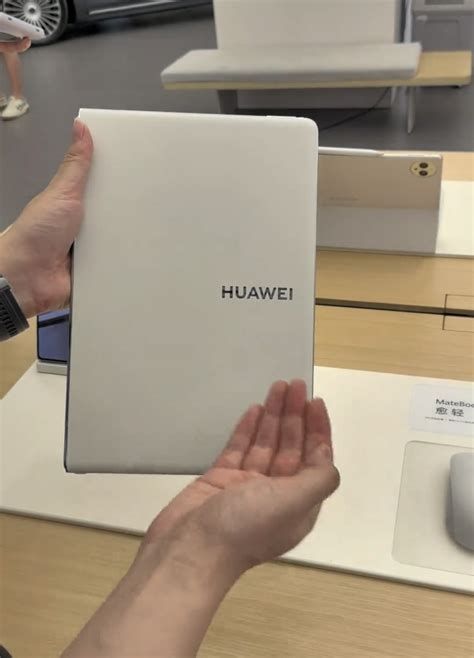
Daily office work
For email, spreadsheets, slide editing, and video meetings, the Matebook Fold is more than capable. The large unfolded display makes reference material and notes visible alongside active documents, improving productivity for those who regularly juggle multiple things at once.
Travel and presentations
Unfolding the device to a tablet allows for easy client presentations on the go, and the compact folded footprint fits well into a sleeve. The reviewer found the device well-suited for short business trips, provided a charger is carried for heavier full-day schedules.
Creative sketching and annotation
With a responsive stylus and a generous canvas, the device provides a natural sketching surface for quick mockups, annotations, and ideation sessions. It’s not a replacement for high-end graphic tablets in professional illustration pipelines, but it excels at ideation, note-taking, and light image editing.
Media consumption
Streaming video and casual gaming looked and sounded excellent; the OLED panel’s contrast and color made movies enjoyable, and quiet speakers delivered acceptable volume and clarity for hotel-room viewing and in-flight entertainment (where allowed).
Final verdict
The Huawei Matebook Fold is a persuasive demonstration that foldable laptops can move beyond novelty into useful, everyday tools. After a month of hands-on use, the reviewer concluded that the device delivers a uniquely flexible experience: it combines a tablet’s intimacy with a laptop’s productivity. The foldable display is the defining feature, providing an unusually large, portable canvas that benefits multitaskers, creatives, and frequent travelers.
That said, the Matebook Fold is not without compromises. Buyers should be clear-eyed about trade-offs: a premium price, limited port selection, compact keyboard ergonomics, and thermal limits under sustained heavy workloads. Durability and repairability remain open questions for the long term compared with traditional clamshells. For those who prioritize the novelty and practicality of a foldable and are prepared to accept these trade-offs, the Matebook Fold is a compelling, forward-looking choice. For buyers whose priorities are raw sustained performance, the deepest battery life, or the most comfortable full-size keyboard, a traditional ultrabook or workstation laptop remains the more practical option.
Conclusion
The Matebook Fold is best understood as a new category entry with clear strengths: an exceptional display, flexible modes of use, and a premium, carefully engineered design. It converts well for people who want a single device that can behave like a tablet for sketching and a laptop for productivity. For mainstream buyers who prioritize conventional benchmarks—battery longevity, repair simplicity, or maximum sustained performance—the Matebook Fold should be considered alongside those priorities and the buyer’s tolerance for early-adopter trade-offs. Ultimately, the device points to a future where laptops become more adaptable to the tasks they serve, and for many users that future is arriving now.